The Export / Import page allows you to quickly back up or transfer your FAQ groups and items. With just a click, you can generate a Downloadable .json file containing all your FAQ content-perfect for migrating to another site with appearance, all-settings, and creating a backup, or duplicating setups across multiple projects. This ensures your data remains safe, portable, and easy to manage.
You can Export all FAQ Groups go to your Dashboard → Ultimate FAQ > Export/Import menu in the plugin. Then, select the specific data types you want to export and just click Export & Save your FAQ.json file. This makes it simple to back up or move your setup effortlessly.
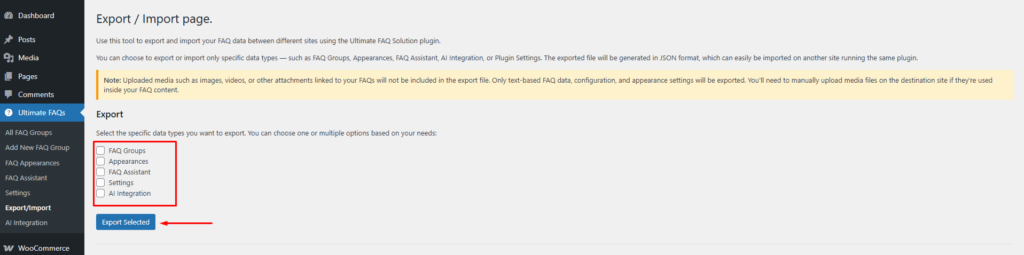
Note: Uploaded media such as images, videos, or other attachments linked to your FAQs will not be included in the export file. Only text-based FAQ data, configuration, and appearance settings will be exported. You’ll need to manually upload media files on the destination site if they’re used inside your FAQ content.
🛠️ Support & 💬 Feedback
Need help or want to share your thoughts? We’re here for you!
📩 Support Options
If you’re facing issues or have questions about using the Ultimate FAQ Solution plugin, please reach out through any of the following channels:
- 🧾 Open a support ticket:
https://www.braintum.com/support/ - 📬 Contact form:
https://www.braintum.com/contact-us/ - 📧 Email us directly:
[email protected]
🛠️ Bug Reports & Contributions
Want to report a bug or contribute code? We welcome community feedback and contributions:
- 🐛 GitHub Repository:
https://github.com/Braintum/ultimate-faq-solution
Feel free to open issues, submit pull requests, or suggest improvements. Your input helps make this plugin even better!